
Parental Control App - Kidsee
ArtpoldevParenting
4.454.00 Reviews
- Version
- 11.1
- Installs
- 100.00K
- Age Rating
- Everyone
Screenshots
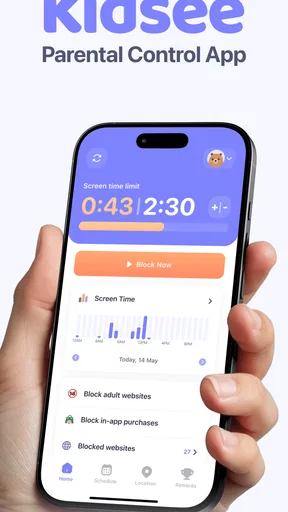
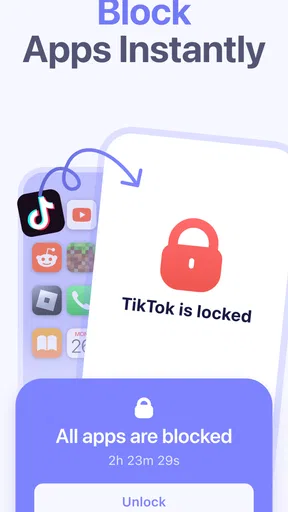
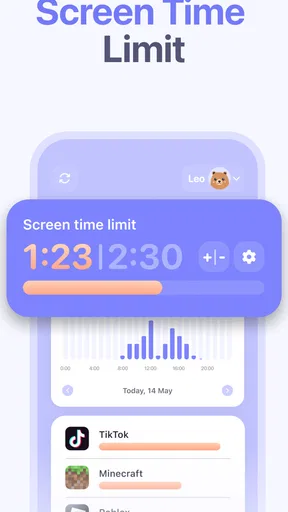
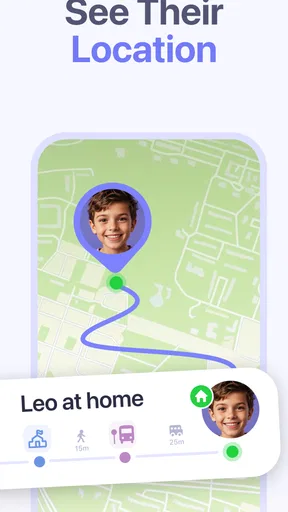
Our Review of Parental Control App - Kidsee
 Analysis by Appyee
Choosing parental controls is not just about finding the strictest lock. I want something I can understand quickly, adjust to a child’s real routine, and explain without turning every device into a source of arguments. That balance is where Parental Control App - Kidsee aims to help: it brings screen limits, app blocking, schedules, and location tools into a parent-focused app. My main question is whether that mix feels clear and practical for different families, including those who need a simpler, less visually demanding way to manage settings.
Readability and navigation: keeping the parent’s job manageable
The first hurdle with a parental-control tool is usually not a complicated feature; it is finding the right setting at the moment you need it. Kidsee’s appeal is that the main tasks are familiar: decide what can be used, choose when it can be used, and check a child’s location when there is a real reason to do so. I find that kind of organization easier to think through than a long list of technical controls, especially when I am setting things up between school pickup and dinner.
There is still a learning curve in the decisions themselves. A screen-time limit can sound straightforward until a child uses a phone for homework, calls, and entertainment in the same day. I would start with a modest schedule, explain it to the child, and then adjust it after seeing where it clashes with ordinary routines. That approach is more useful than trying to configure every restriction perfectly on the first pass.
Motor and sensory considerations: fewer rushed decisions
For a parent who has limited time, or who finds dense menus tiring to work through, parental controls are most helpful when the everyday choices are easy to identify. Kidsee’s focus on limits, schedules, blocked apps, and location gives me a clear checklist for deciding what to configure. I would make changes while calm and seated rather than trying to adjust several controls while walking, supervising children, or responding to an alert.
That is a practical accessibility point, not a claim that the app has a particular accessibility certification or specialized interface feature. Families with low vision, motor difficulties, sensory sensitivities, or different reading needs should try the actual screens on the devices they plan to use. A parent should be able to read a setting, understand its effect, and reverse it without needing to navigate under pressure. If that does not feel comfortable in your household, a simpler built-in control may be a better fit.
Using Kidsee in everyday family life
I find Kidsee most useful when I treat it as a way to make a family routine easier to follow, not as a substitute for talking through the rules. Before changing a limit, I’d agree on what the household needs that week and note which setting is meant to help. That makes it easier to tell whether a schedule is genuinely working or simply getting in the way.
Situational access: routines matter more than blanket rules
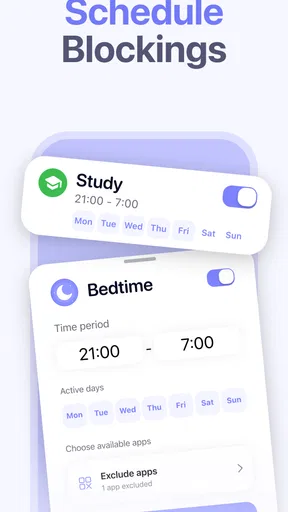
A useful way to approach screen schedules is to tie them to predictable parts of the day rather than treating every hour alike. For example, a family might want devices put aside during dinner and homework, while keeping access available at other times. The point is not to make every child’s day identical; it is to set a routine that parents and children can understand. Kidsee’s ability to customize usage schedules can support that kind of boundary, provided you revisit it when school, activities, or family plans change.
Location features also make more sense when used for a specific situation instead of constant checking. A parent might want reassurance that a child has reached a familiar destination, or need to know whether a child is still in an agreed area after an activity. Before relying on location information, I would discuss when it will be checked and why. That conversation helps keep a safety tool from feeling like secret surveillance, and it gives older children a clearer sense of the family’s expectations.
Remaining barriers: compatibility, trust, and the limits of controls
Kidsee is a parenting app from Artpoldev, and its current version is 10.0. It is free to install, with in-app purchases ranging from $2.99 to $99.99 per item, so I would look carefully at any purchase screen before committing to paid options. The app is rated for Everyone, has a 4.2 average from around 5,800 ratings, and has passed 100,000 installs. Those figures suggest that other families have tried it, but they cannot tell you whether its controls match your child’s device or your own comfort level.
Parents should also check the operating-system requirements before planning a household setup: the listed minimum is Android 7.0. If a child uses a different platform or an older device, confirm compatibility in the relevant app store before building a routine around the service. The app’s release date is February 11, 2025, and its install count is useful context, but neither replaces checking how it behaves on the specific phones your family uses.
One limitation I would keep in mind is that a control app cannot teach judgment by itself. Blocking an app may prevent access through that route, but it does not explain why a boundary exists or how a child should handle an uncomfortable interaction online. I would pair limits with short, age-appropriate conversations and leave room for a child to ask for help without fearing an automatic punishment. If your priority is a family discussion tool rather than remote restrictions, a less control-heavy approach may suit you better.
Who benefits most, and when another option makes sense
Kidsee is most relevant to parents who want a single place to manage app access, screen routines, and a child’s location. It may be especially useful when several adults share responsibility: agreeing on a schedule in advance can prevent one caregiver from loosening a rule while another expects it to apply. Before relying on that arrangement, make sure everyone understands the same settings and knows who is responsible for changing them.
For a household that only needs a basic bedtime limit or occasional app restriction, the controls already available on a child’s phone may be enough and can mean one less service to manage. At the other end, a family that needs detailed reporting, extensive filtering, or controls tailored to a particular learning or accessibility need should compare options carefully rather than assume Kidsee covers every case. Its combination of everyday controls is appealing, but the right choice depends on what your family actually needs to monitor and how much oversight feels fair.
A practical setup tip is to begin with one change at a time. Set a schedule first, see how it affects a normal school day, then decide whether app blocking or location checks add something useful. If several restrictions are switched on at once, it becomes harder to tell which one is causing friction. Keep a note of the original routine and review the settings with your child after a week or after a major schedule change. That small habit can make controls feel adjustable rather than arbitrary.
Getting started with Kidsee
Ever found yourself wondering how you can keep tabs on your kids in this digital age without being the overbearing guardian? Well, join the club! I’ve been on the hunt for a solution, and I think I’ve found a gem in the Parental Control App - Kidsee. Let me take you through my experience with it.
First things first, getting Kidsee up and running was a breeze. The app is available for both Android and iOS, so no worries if your household is a mix of both. The download was quick, and the setup process was straightforward. They’ve clearly put some thought into making the user interface intuitive, which is a huge relief for those of us who aren’t exactly tech wizards.
Once you’ve got the app installed, it walks you through linking your kid’s device. You’ll need to add a profile for each child, which involves setting up permissions and controls. The app offers a plethora of customization options so you can adjust the settings to fit your family’s unique needs.
Features that stand out
Kidsee’s standout feature is its real-time location tracking. As a parent, knowing where your child is at any given moment is invaluable. The app provides accurate GPS tracking, and you can even set up geofences. If your child steps outside a designated area, you’ll get an instant notification. Peace of mind? Check.
Another feature I appreciated is the app’s ability to monitor screen time. With Kidsee, you can set daily screen time limits and enforce device-free periods. This is perfect for ensuring your kids aren’t glued to their screens all day, especially during homework time or family dinners.
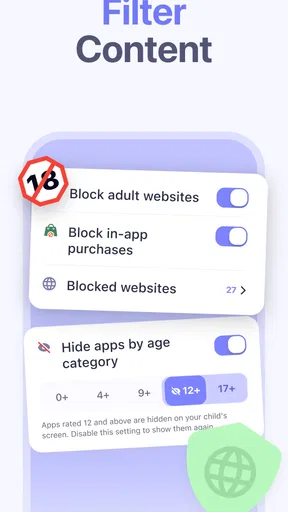
Kidsee also shines with its content filtering options. You can block inappropriate websites and apps, ensuring your child’s online experience is safe. It’s like having a digital guardian angel watching over their shoulder.
Communication and alerts
Communication is key, and Kidsee doesn’t disappoint. The app allows you to send messages directly to your child’s device, which is super handy if you need to get their attention quickly. Plus, it supports emergency alerts, giving your child a quick way to reach you if they need help.
I found the alerts to be timely and reliable. Whether it’s a notification about excessive screen time or a location-based alert, the information is delivered promptly, allowing you to take necessary actions when needed.
Performance and reliability
In terms of performance, Kidsee runs smoothly without causing any noticeable lag on my kid’s device. The app’s updates are regular, ensuring that any bugs or issues are quickly addressed. Reliability is crucial for a parental control app, and Kidsee seems to have this aspect well sorted out.
The app supports multiple devices, so if you’ve got a big family, it’s not a problem. Everything is managed from a single dashboard, making it easy to keep track of everyone at once.
An inclusive verdict for families
Overall, I’m genuinely impressed with what Kidsee brings to the table. It’s a comprehensive tool that offers parents the peace of mind they need in today’s digital world. While no app can replace active parenting, having Kidsee as a sidekick certainly makes the job a lot easier.
If you’re looking for a reliable and effective way to manage your kids’ digital activities, I’d say give it a try. It’s like having an extra set of eyes, ensuring your little ones are safe as they explore the digital landscape.
Privacy and Permissions
See what permissions an app requests and how it handles your data.
- Location
- approximate location (network-based), precise location (GPS and network-based)
- Photos/Media/Files
- read the contents of your USB storage, modify or delete the contents of your USB storage
- Storage
- read the contents of your USB storage, modify or delete the contents of your USB storage
- Camera
- take pictures and videos
- Wi-Fi connection information
- view Wi-Fi connections
- Other
- view network connections, full network access, run at startup, draw over other apps, prevent device from sleeping, Google Play license check, read Google service configuration
Verdict
Strengths of Parental Control App - Kidsee
- User-friendly interface for easy navigation.
- Real-time location tracking for peace of mind.
- Customizable screen time limits.
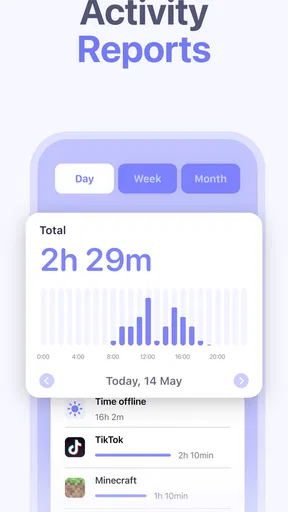
- Comprehensive app usage reports.
- Supports multiple devices per account.
Limitations of Parental Control App - Kidsee
- Limited features in free version.
- Some features require stable internet.
- Occasional delays in real-time updates.
- May impact device battery life.
- Complex setup for non-tech-savvy users.
Similar Picks in This Category
View All
Family Space
Motorola Mobility LLC.3.9

شرطة الأطفال - مكالمة وهمية
Oub Apps4.1

Findmykids: Parental Control
LETEM LTD4.6

Pregnancy + | Tracker App
Philips Electronics UK Limited4.8

Policía de niños - para padres
Kids police4.7

Pregnancy App
Amila4.9
Frequently Asked Questions
What features does Kidsee offer for parental control?
Kidsee provides a comprehensive set of features designed to help parents manage their children's digital activities. These include app blocking, screen time management, web filtering, and location tracking. Additionally, Kidsee offers real-time alerts and detailed activity reports, ensuring parents stay informed about their child's online behavior.
Is Kidsee compatible with both Android and iOS devices?
Yes, Kidsee is compatible with both Android and iOS devices. The app is designed to work seamlessly across different platforms, allowing parents to monitor and control their child's activities regardless of the device they use. This cross-platform compatibility ensures flexibility and ease of use.
How does Kidsee ensure data privacy and security?
Kidsee prioritizes user privacy by implementing robust data protection measures. The app uses encryption to secure data and follows strict privacy policies to ensure that user information remains confidential. Parents can trust that their family's data is safe from unauthorized access, providing peace of mind while using the app.
Can Kidsee be customized for different age groups?
Yes, Kidsee allows for customization based on the child's age, ensuring that controls are age-appropriate. Parents can adjust settings to suit the developmental stage of their child, providing a tailored experience that grows with their needs. This flexibility makes Kidsee suitable for families with children of different ages.
Is there a subscription fee to use Kidsee, and what does it include?
Kidsee operates on a subscription model, offering various plans to cater to different needs. Subscriptions typically include all major features such as app blocking, screen time management, and location tracking. Plans may vary in terms of the number of devices covered and additional premium features, providing options for different family sizes and requirements.
